Vision Board Planner for Canva KDP: A Designer's Guide
Every designer knows that the most powerful creative projects start with a clear vision—and the right tools to bring that vision to life. The Vision Board Planner for Canva KDP is more than just a collection of templates; it is a strategic creative asset designed to streamline your workflow, elevate your visual communication, and help you build a cohesive brand identity from the ground up. Whether you are crafting a personal brand, developing social media graphics, or preparing an Amazon KDP interior, this planner offers a structured yet flexible foundation that saves time while ensuring professional-grade results.
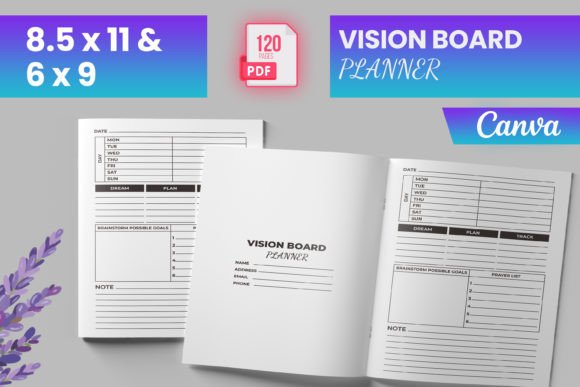
At its core, this planner is a fully editable Canva template that includes a ready-to-upload PDF file sized at 6x9 or 8.5x11 inches—standard dimensions that work seamlessly across print and digital platforms. With 120 total pages, an intro page, and dedicated spreads like “My Best Self,” “Vision Board,” “Letter to the Universe,” and “Gratitude,” it provides a complete system for goal setting and creative planning. The interior comes with bleed, tested on Amazon KDP to meet Kindle Direct Publishing specifications, so you can upload with confidence. Bonus PNG and JPG files give you additional flexibility for social media snippets, website graphics, or promotional materials.
Why This Planner Matters in Modern Graphic Design
In today’s fast-paced design landscape, consistency and clarity are non-negotiable. A vision board planner serves as a visual anchor—a place where typography, color palettes, imagery, and layout converge to reflect your unique brand identity. For designers working on branding projects, editorial layouts, or digital marketing campaigns, having a pre-structured yet customizable template reduces repetitive setup work and allows you to focus on what truly matters: the creative direction.
The Vision Board Planner for Canva KDP also supports a critical aspect of design workflow: visual hierarchy. Each page is thoughtfully arranged to guide the eye from aspirations to action steps, making it easier for users to connect with the content. This is especially valuable when designing for clients who need a clear, intuitive tool that aligns with their personal or business goals.
Practical Applications Across Creative Projects
This planner isn’t limited to personal use. It can be adapted for a wide range of professional applications, including:
- Branding and logo design — Use the vision board pages to map out mood boards, color stories, and typography directions before moving into final asset creation.
- Marketing materials and social media graphics — Repurpose the layouts for Instagram posts, Pinterest pins, or Facebook covers that maintain consistent brand language.
- Website and UI design — Leverage the structured sections to plan user flows, content blocks, and visual elements for digital interfaces.
- Editorial layouts and print design — The 8.5x11-inch format is ideal for magazines, planners, workbooks, and other print-ready projects.
- Packaging design and advertising campaigns — Use the gratitude and affirmation pages as inspiration for copy and visual storytelling in product packaging or ad creative.
- Presentations and digital products — The clean, modern aesthetic translates well into slide decks, ebooks, and online courses.
Tips for Selecting and Using Design Elements Effectively
To get the most out of this planner, consider a few best practices that align with professional design standards. First, maintain consistency across your chosen color palette and typography—this reinforces brand recognition and creates a cohesive visual experience. Second, prioritize readability by balancing text with white space; the planner’s layouts already support this, but customizing font sizes and line spacing can further enhance accessibility. Third, think about scalability: ensure that any imagery or icons you add work well at both small and large sizes, especially if you plan to repurpose the design for different formats.
When working with typography, select fonts that reflect the tone of your brand—whether that’s modern sans-serifs for a sleek look or elegant scripts for a more personal feel. Pairing a display font with a clean body text creates visual hierarchy and guides the reader naturally through each section. Similarly, your color choices should resonate with the emotional undertone of the planner: warm tones for inspiration, cool tones for focus, or neutral backgrounds for a timeless aesthetic.
Integration with Your Existing Brand System
One of the strongest advantages of this editable planner is its compatibility with your current brand assets. Because it is built in Canva, you can easily import your logo, brand colors, and custom graphics. This makes it an excellent tool for designers who need to deliver a polished, on-brand experience for clients or for their own businesses. The included checklist, yoga log, and “My Average Day” spread add functional depth, turning a simple vision board into a comprehensive lifestyle or productivity tool.
For digital marketers, the PNG and JPG files enable quick sharing across social channels, email newsletters, or blog posts. The tested KDP compliance means you can also sell the planner as a low-content or medium-content book on Amazon, opening up passive income opportunities without worrying about technical rejections.
Ultimately, thoughtful design choices—whether in typography, color, composition, or imagery—elevate any creative project from ordinary to exceptional. The Vision Board Planner for Canva KDP provides the structure, while your expertise brings the magic. By investing in quality creative assets that are both versatile and aligned with modern aesthetics, you set yourself up for stronger visual communication, deeper user engagement, and a more polished professional presentation. Whether you are designing for yourself or for a client, this planner is a catalyst for turning intention into action—and vision into reality.