Paycheck Budget Planner for Canva KDP: What You Need to Know Before You Buy or Create
Managing money starts with knowing exactly where every dollar goes. A paycheck budget planner helps you track income and expenses on a pay-period basis rather than monthly—a method that works well for people paid biweekly, weekly, or on irregular schedules. When you combine that planning approach with a Canva template designed for Amazon KDP (Kindle Direct Publishing), you get a powerful tool that can save time and reduce frustration—provided you avoid a few common pitfalls.
Whether you are a creator looking to publish your own planner or a consumer searching for the right downloadable template, understanding what makes a paycheck budget planner effective is essential. Many people jump in too quickly and end up with files that look great on screen but fail when printed or uploaded.
What Is a Paycheck Budget Planner for Canva KDP?
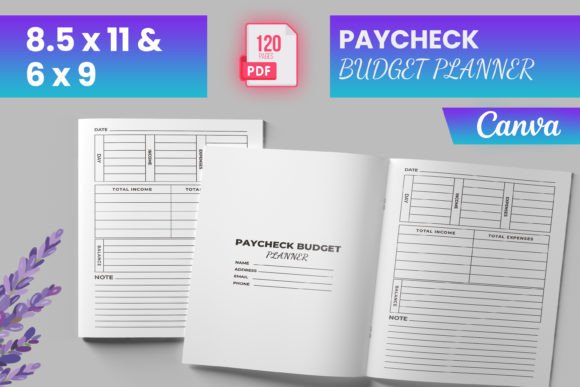
A paycheck budget planner for Canva KDP is a digital template that you can edit in Canva, customize with your branding or personal needs, and then upload to Amazon KDP for print-on-demand publishing (or use for your own printing). The product listing you may encounter often includes:
- Ready-to-upload PDF file – formatted for KDP with bleed (typically 0.125 inches extra on each edge)
- Multiple trim sizes – commonly 6 x 9 inches and 8.5 x 11 inches
- 120 total pages – including an intro page and a “Belongs To” page
- Editable files – such as PNG and JPG versions for further customization
- Testing validation – files stated to be tested on Amazon KDP to ensure quality
This type of product appeals to two distinct groups: creators who want to publish a budget planner on KDP with minimal formatting hassle, and individuals who want a ready-made, editable planner they can print at home or through a service.
Common Mistakes When Choosing or Using a Paycheck Budget Planner Template
Even with a well-made template, things can go wrong. Here are the most common missteps and practical ways to avoid them.
1. Overlooking Bleed and Trim Requirements
One of the biggest mistakes is ignoring the bleed specification. A KDP interior with bleed must extend 0.125 inches beyond the final trim size. If you skip this, content near the edges may get cut off after trimming. The product description explicitly says “Interior is with BLEED READY TO UPLOAD”, but some buyers edit the file in Canva and accidentally remove the bleed guides.
How to avoid it: Always keep the original bleed margins. If you are using the editable Canva template, check that your design elements extend to the edge of the canvas (not just the safe zone). For the 6 x 9 inch size, the document should actually be 6.25 x 9.25 inches to account for bleed. Test by exporting a PDF and viewing it with trim marks enabled.
2. Mismatched Trim Size Choices
Many buyers assume that one template can work for both 6 x 9 and 8.5 x 11 without modification. While the product includes both sizes, you must use the correct file for your intended KDP listing or printer. Uploading a 6 x 9 file into an 8.5 x 11 book setting can stretch or distort content.
Better approach: Decide on your final trim size before you start editing. If you are publishing on KDP, create separate interior files for each size. Do not resize a 6 x 9 layout to 8.5 x 11 manually unless you understand how to adjust margins and fonts proportionally.
3. Ignoring the “Belongs To” Page Details
The “Belongs To” page seems trivial, but it affects the user experience. Some creators replace it with a generic title page, forgetting that personalization is a key selling point for planners. Buyers often look for that personal touch.
Practical advice: Keep the “Belongs To” page but make it visually appealing. If you are a consumer, ensure the editable file allows you to add your name easily. A blurred preview or placeholder text in the PNG files can make customization harder.
4. Not Testing the Uploaded File on KDP
The product says “Files were tested on Amazon KDP to ensure quality.” That does not mean your edited version will pass KDP validation. Changing elements, adding new fonts, or exporting with wrong PDF settings can cause errors.
What to do: Before finalizing your KDP upload, use the KDP previewer tool. Check for missing images, font embedding issues, and margin problems. Even if the original template passed, your modifications may need a separate review. Always export PDFs with “PDF/X-1a:2001” or “PDF/A” standards for print compatibility.
5. Neglecting Page Numbering and Flow
A 120-page planner sounds comprehensive, but if the pages are not numbered logically, users may struggle. Some templates include an intro page, then jump straight into weekly or biweekly sections without clear navigation.
Solution: Add page numbers and a brief table of contents at the start. If you are editing the template, verify that the intro page flows naturally into the budget pages. For KDP interiors, page numbers should start after the intro and “Belongs To” page to avoid confusion.
6. Misusing the Editable PNG and JPG Files
PNG and JPG files are included for further customization in Canva, but they have limitations. PNG files preserve transparency, which can cause issues if you overlay them on colored backgrounds. JPG files are smaller but lose transparency support.
How to handle this correctly: Use the PNG files only when you need transparent layers (e.g., overlaying on a custom background). For standard printing, stick with the provided PDF. If you plan to edit them in Canva, duplicate the original template first so you always have an unmodified backup.
7. Assuming One Template Fits Every Pay Period
Paycheck budgets vary. Someone paid weekly may need 52 pages per year, while a biweekly worker needs 26. A monthly budgeter might find the planner wasteful. Many templates assume a specific frequency and provide only 12 monthly pages or 26 biweekly spreads. Check the interior before assuming it covers your exact needs.
Recommendation: Count the usable budget pages. In a 120-page file, subtract the intro, “Belongs To,” and any extras. If the planner has, say, 24 biweekly spreads, it covers about 48 weeks—close to a year but not exactly. You may need to print extra copies or supplement with additional pages. If you are a creator, consider offering a version with 26 biweekly spreads plus some undated pages for flexibility.
What to Check Before Making a Decision
Before buying or using a Paycheck Budget Planner for Canva KDP, verify these critical points:
- File format compatibility: Ensure the editable files (PNG, JPG) work in Canva’s free plan if you do not have Canva Pro. Some templates use premium fonts or elements.
- Bleed and trim settings: Confirm that the PDF is set to the correct dimensions (6.25 x 9.25 for a 6 x 9 book).
- Page count accuracy: 120 pages may include blank or filler pages—check that the actual budget content meets your needs.
- Review KDP guidelines: Even if the template says “tested on KDP,” read Amazon’s latest requirements for margins, bleed, and color space. They occasionally change.
- Customizability: Determine whether you can change colors, fonts, and layout without breaking the design. Canva templates vary in how much editing freedom they allow.
Realistic Example: A Creator’s Path to a Successful KDP Upload
Imagine Sarah, a freelance designer who wants to publish a paycheck budget planner. She downloads a template that includes the 6 x 9 and 8.5 x 11 sizes, 120 pages, editable PNG/JPG files, and a “Belongs To” page. She avoids common mistakes by:
- Keeping the original bleed guides intact during editing
- Using the correct file for her chosen trim size (6 x 9)
- Adding a clean table of contents and page numbers
- Testing her PDF in KDP preview before submitting
- Making sure the budget spreads work for biweekly schedules (26 pages for a year)
Her planner passes KDP validation on the first try, and customers appreciate the professional finish. She also offers the editable Canva link so buyers can personalize the “Belongs To” page—a small touch that increases satisfaction.
Better Choices for Better Results
Whether you are buying or creating, the goal is a functional planner that prints well and meets user expectations. Avoid hasty decisions. Check the bleed, test your files, understand the page count, and choose the correct trim size. The editable PNG and JPG files are great for last-minute customizations, but rely on the PDF for final uploads.
If you are new to KDP, start with the 8.5 x 11 size because it is more forgiving for beginners—larger fonts and wider margins reduce the chance of content being cropped. Once you are comfortable, experiment with the 6 x 9 format, which is popular for smaller, portable planners.
Paycheck budgeting works because it aligns with cash flow timing. A well-designed planner makes that alignment easy. By paying attention to these details, you can get the most out of your Paycheck Budget Planner for Canva KDP template—whether you use it yourself or publish it for others.